Command-line interface
The options of the CLI utility build_heterostructure can be shown via:
hetbuilder --help
In the following, a couple of examples are shown to illustrate different parameter choices.
The build utility
The build utility runs the coincidence lattice algorithm once for a given choice of parameters and visualizes the results interactively.
hetbuilder build --help
Searching specific angles
Specific angles can be passed explicitly with the -a option and can be called multiple times:
hetbuilder build a.xyz b.xyz -a 0.15 -a 20.4 -a 30.1
This takes precedence over the specification of angles via the angle limits and the angle stepsize.
Reducing the angle range
If both layers are highly symmetric, e.g., both have a hexagonal $C_6$ rotation axis, then it does not make sense to search through the entire range between 0 and 90°. It is sufficient in this case to look for angles in the range between 0 and 30°, e.g., with a stepsize of 0.5°:
hetbuilder build a.xyz b.xyz -al 0 30 -as 0.5
Changing the number of translations
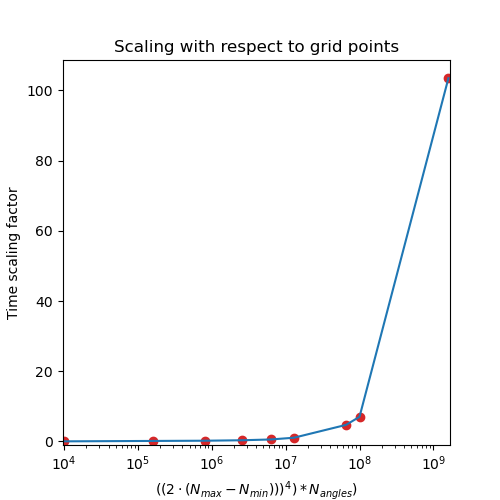
The maximum and minimum number of translations $N_{max}$ and $N_{min}$ are the most performance-relevant parameters. Choosing a large number of translations (e.g., 100) is possible but leads to longer run times. In this case, it might help to make more OpenMP threads available by setting the environment variable OMP_NUM_THREADS to a larger value.
Usually, one is interested in the smallest coincidence cell possible with small allowed strain. For most practical purposes, $N_{max}$ is set to $10$ because of that.
Choosing large values for both is useful if one wants to look for very large supercells. For example:
hetbuilder build a.xyz b.xyz --Nmin 100 --Nmax 125
But other parameters might need adjustment for that purpose as well, such as the tolerance. Accessing these large structures via the matplotlib interface might be problematic, so it is recommended to search for these large supercells via the python interface.
Changing the tolerance
The tolerance corresponds to a distance between lattice points in Angström. Choosing a larger tolerance accepts more lattice points and generates more supercells, but these might have a larger total lattice mismatch.
hetbuilder build a.xyz b.xyz -t 0.2
Changing the weight factor
Changing the weight factor $w$ only affects the final coincidence supercells, not the results algorithm itself. A weight factor $w=0$ means that the coincidence unit cell is given only by the supercell of the lower layer. A weight factor $w=1$ means that the coincidence unit cell is given only by the supercell of the upper layer. Correspondingly, this allows to remove stresses from one of the layers at expense of the other.
hetbuilder build a.xyz b.xyz -w 0
The match utility
The match utility only looks for the smallest stress result from the algorithm and writes it to a file.
hetbuilder match --help
The syntax is similar to the build utility. The algorithm is executed automatically for different tolerance values.